Tallyfy’s REST API gives developers full programmatic access to the same platform features that…
API integration guide
Integrating with the Tallyfy REST API
Section titled “Integrating with the Tallyfy REST API”Tallyfy’s REST API lets you connect workflow features to your own applications and systems.
API terminology
Section titled “API terminology”The Tallyfy API uses different names than what you’ll see in the web app. Here’s the mapping you’ll need when reading API responses, building integrations, or browsing the API reference ↗:
| What users see in the app | API endpoint | Other names you might see in code or older docs |
|---|---|---|
| Template | /checklists | Blueprint, checklist |
| Process | /runs | Run, workflow |
| Step (inside a template) | /steps | Step |
| Task (inside a running process) | /tasks | Task |
| Task form field | /form-fields | Capture, form field |
| Kick-off form field | /preruns | Prerun, KO form, kick-off form |
| Comment or issue on a process | /runs/{id}/comment, /runs/{id}/problem, /runs/{id}/resolved-threads | Thread |
| Comment or issue on a template | /checklists/{id}/comment, /checklists/{id}/problem, /checklists/{id}/resolved-threads | Thread |
A template “becomes” a process when launched. A step “becomes” a task once the process is running. Form fields collect data inside tasks; kick-off form fields collect data before a process starts.
These name differences are historical and only show up when reading API responses or older code. The Tallyfy app itself only uses the user-facing names (Template, Process, Task, etc.).
Required headers
Section titled “Required headers”Every API call must include these headers:
Authorization: Bearer YOUR_ACCESS_TOKENX-Tallyfy-Client: APIClientAccept: application/jsonImportant: Tallyfy rejects requests without the X-Tallyfy-Client header.
Authentication methods
Section titled “Authentication methods”Tallyfy supports two authentication approaches:
1. User-based authentication
Section titled “1. User-based authentication”For integrations acting on behalf of a specific Tallyfy user:
- Go to Settings > Integrations > REST API in your Tallyfy account
- Copy your personal access_token
- Include this token in the
Authorizationheader of your API requests
This video shows how to get your access token:
2. Application-based authentication
Section titled “2. Application-based authentication”For third-party apps needing client credentials:
- Contact Tallyfy Support describing your integration needs
- You’ll receive a Client ID and Client Secret
- Implement the OAuth 2.0 flow to get and refresh access tokens
OAuth authentication flow
Section titled “OAuth authentication flow”This diagram shows the full OAuth flow for both authentication methods.
What to notice:
- Steps 1-4 show initial authentication - use password grant for user context or client credentials for app-only access
- Step 5 shows required headers for all API requests - both
AuthorizationandX-Tallyfy-Clientheaders are mandatory - Steps 6-10 show token refresh when a 401 error occurs - your app should handle this retry automatically
Token management
Section titled “Token management”Handling token invalidation
Section titled “Handling token invalidation”Personal access tokens are invalidated when users log out. To reduce disruption:
- Automated systems: Use application tokens (Enterprise plans) instead of personal tokens when possible
- User-based integrations:
- Let users know that logging out breaks automations
- Add error handling to detect invalidated tokens
- Provide clear steps for getting new tokens after logout
- Monitoring: Log authentication failures to spot patterns early
Token security
Section titled “Token security”- Store tokens with encryption at rest
- Never expose tokens in client-side code or logs
- Rotate tokens regularly for sensitive operations
- Handle token expiration by refreshing automatically
Working with multi-organization users
Section titled “Working with multi-organization users”Tallyfy users can belong to multiple organizations1. This matters for API integrations:
Organization context in API requests
Section titled “Organization context in API requests”- A user’s access token is tied to their current organization
- API requests operate within that organization’s context
- Organization IDs are required in most API endpoint URLs (e.g.,
/organizations/{org_id}/checklists)
Collecting organization IDs
Section titled “Collecting organization IDs”When building integrations:
- Collect the organization ID during setup
- Store it alongside user credentials in your app
- Include it in your API request URLs
Multiple organizations
Section titled “Multiple organizations”For users belonging to more than one organization:
- Let users pick which organization to work with
- Store multiple organization IDs if your app spans organizations
- Permissions and data differ between organizations
- You may need updated tokens when switching organizations
Getting access tokens with password grant
Section titled “Getting access tokens with password grant”Getting 401 “Unauthenticated” errors despite having valid client credentials? You likely need the password grant flow.
- Make a POST request to the OAuth token endpoint:
POST https://go.tallyfy.com/api/oauth/tokenContent-Type: application/x-www-form-urlencoded
grant_type=password&client_id=YOUR_CLIENT_ID&client_secret=YOUR_CLIENT_SECRET&username=YOUR_EMAIL&password=YOUR_PASSWORD- You’ll get a response with an access token:
{ "token_type": "Bearer", "expires_in": 3600, "access_token": "eyJhbGci...", "refresh_token": "def50200..."}- Use this token in the
Authorizationheader:
Authorization: Bearer YOUR_ACCESS_TOKENUnderstanding grant types
Section titled “Understanding grant types”| Grant type | Purpose | Access context | Best for |
|---|---|---|---|
| client_credentials | App-to-app authentication | Application context only | Backend services, system integrations |
| password | User-based access via application | Full user context | Endpoints requiring user permissions |
Key distinction: Most Tallyfy API endpoints require user context, so password grant is usually what you need. If you’re getting 401 errors with a client_credentials token, switch to password grant.
Token refresh
Section titled “Token refresh”Access tokens expire after 1 hour and need refreshing:
- Store both the access_token and refresh_token when first obtained
- When the access token expires, POST to the token endpoint with your refresh token
- You’ll receive a new access token (and sometimes a new refresh token)
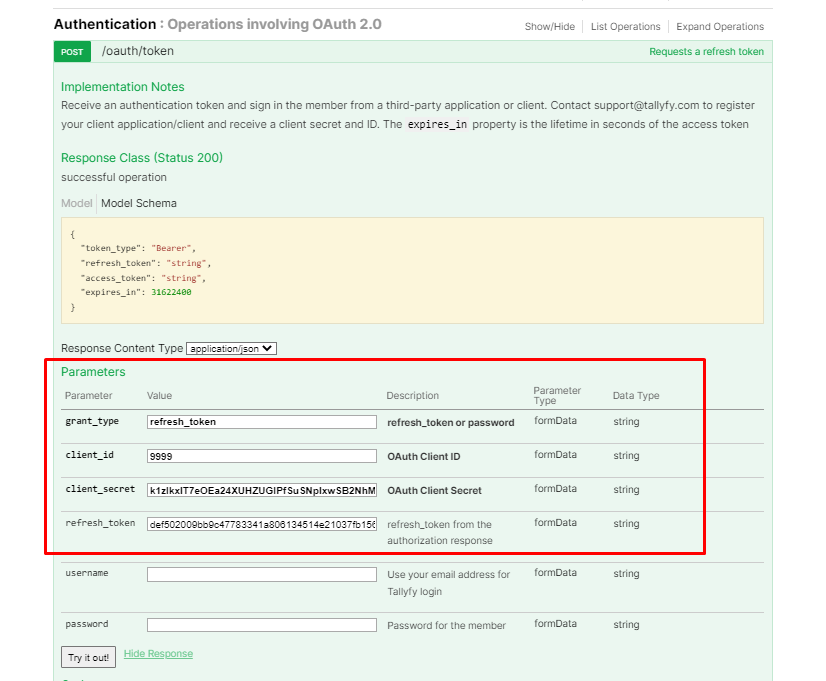
This video shows the token refresh process:
Troubleshooting authentication
Section titled “Troubleshooting authentication”401 unauthenticated errors
Section titled “401 unauthenticated errors”-
Token format: Make sure your Authorization header is exactly:
Authorization: Bearer YOUR_ACCESS_TOKENThere must be exactly one space between “Bearer” and your token.
-
Token expiration: Tokens expire after 1 hour. Refresh or request a new one.
-
Invalid credentials: Double-check your client ID, client secret, username, and password.
-
Missing headers: Every request needs the
X-Tallyfy-Client: APIClientheader. -
Wrong token endpoint: Confirm you’re hitting
https://go.tallyfy.com/api/oauth/tokenwith the correctgrant_type. -
Logout invalidation: Personal tokens are immediately invalidated on logout. If your automation stops working, check whether the user logged out.
If problems persist, check the response body for specific error messages or contact Tallyfy Support with your full error response.
CORS or preflight issues
Section titled “CORS or preflight issues”For cross-origin challenges:
- Watch for CORS preflight (
OPTIONS) requests - Check response headers for CORS permissions
- Verify allowed origins and methods
Preventing duplicate operations
Section titled “Preventing duplicate operations”Date format standards
Section titled “Date format standards”When working with dates in the Tallyfy API:
| Direction | Format | Example |
|---|---|---|
| Request (to API) | YYYY-MM-DD HH:MM:SS | 2025-05-15 14:30:00 |
| Response (from API) | ISO 8601 (Zulu time) | 2025-05-15T14:30:00.000Z |
Make sure your code handles both formats correctly.
Descriptions that reference form fields or people
Section titled “Descriptions that reference form fields or people”The summary, title, guidance, default_value and content parameters accept HTML, and inside that HTML you can reference a form field’s answer, a snippet, another template, or a person. Each reference type is a specific piece of markup carrying a specific identifier.
Send the wrong shape and the API still accepts it, so nothing tells you it was wrong. See rich text references for the exact markup, where to read each identifier from the API, and what happens when a reference stops resolving.
Webhook integration
Section titled “Webhook integration”For event-driven integrations, Tallyfy offers webhooks that don’t require polling the API:
- Configure webhooks at the process or step level
- Get real-time notifications when specific events happen
- Process the webhook payload to trigger actions in your systems
For setup details, see the webhooks setup guide.
Drafting integration code with AI
Section titled “Drafting integration code with AI”If your team has developers and clear requirements, an AI assistant can draft working integration code for you. Use it when you want custom logic beyond what middleware offers, and you need it quickly.
- Write a precise spec of the workflow and the data mappings.
- Ask your AI assistant to generate code that calls Tallyfy’s Open API.
- Review, test, and deploy the code.
- When the rules change, update the spec first, then have the AI revise the code and test it again.
Ask for a clear, maintainable structure with logging and error handling, in your team’s preferred language, such as Python or JavaScript.
For example, a logistics team needs shipping workflows that vary by weight, destination, and carrier. A developer describes the rules, and the AI generates the Python code for a first version.
Related articles
Section titled “Related articles”Api Clients > Getting started with Postman API testing
Test Tallyfy’s REST API in Postman without writing code. Authenticate with the password grant…
Open Api > Third-party application API access
Third-party apps can access Tallyfy’s API through OAuth 2.0 client credentials. Your app gets an…
Tallyfy connects to your other tools in several ways: an open API for developers, an MCP server…
Footnotes
Section titled “Footnotes”-
Organizations in Tallyfy are isolated tenants - each with its own templates, processes, members, and settings ↩
About Tallyfy