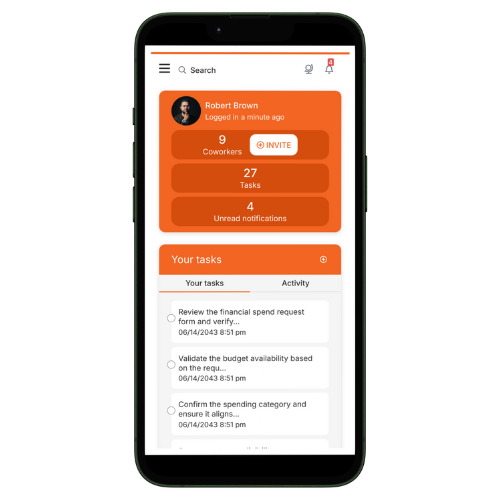
Tallyfy works on any device with a modern web browser. It’s a responsive web app - so there’s nothing to install or configure per device.
Screen size adaptation
Tallyfy’s interface automatically adjusts to fit desktops, tablets, and smartphones. You’ll get the same features on every screen size without needing separate app downloads.
Mobile and remote access
You can manage workflows from anywhere - whether you’re traveling or working remotely. All features work the same regardless of which device you’re using.
No separate mobile app needed
Tallyfy doesn’t have a separate mobile app in app stores because the responsive web app works great on phones already. You get instant access with no install delays, no storage overhead, and no app store dependencies.
Desktop app for enhanced productivity
If you want native desktop integration, Tallyfy offers a desktop app for macOS, Windows, and Linux. It provides:
Native notifications that work even when your browser is closed
System tray integration for quick access
Automatic OAuth login using your existing Chrome browser sessions
Auto-updates so you always have the latest version
Tallyfy offers a desktop app for macOS and Windows that wraps the existing web application while adding native notifications and system tray access and automatic login via Chrome cookie import so users can keep Tallyfy running as a dedicated window outside the browser.
Tallyfy transforms static process documentation into dynamic and trackable workflows with real-time status tracking and conditional logic automation plus external guest collaboration and built-in process optimization tools.
Tallyfy offers a range of resources beyond its core workflow tools including company background and trust information along with support and troubleshooting guides and details on browser compatibility and system features like file storage and search and translation and legal documentation.
Tallyfy replaces static flowcharts and spreadsheets and documents by actually running and tracking your processes in real time with clear task ownership and automatic reminders and step-by-step guidance on any device so teams follow workflows daily instead of ignoring dusty diagrams or outdated files.