The Tallyfy REST API enables developers to build custom integrations with full platform functionality through three authentication methods (user tokens application tokens and OAuth) while providing complete access to process management task operations user administration and data export capabilities with standard JSON responses and reasonable rate limits.
API integration guide
Tallyfy provides a REST API that enables developers to integrate workflow functionality into external applications and systems.
While the Tallyfy web application uses certain terms in its user interface, the underlying Tallyfy API sometimes uses different terms for the same concepts. Understanding these differences is important when working directly with the API.
Here’s a mapping of key API objects to their corresponding terms in the Tallyfy UI:
- API
Checklistscorrespond to Blueprints in the UI. A Blueprint contains Steps. - API
Runscorrespond to Processes in the UI. A Process contains Tasks. - API
Capturescorrespond to Task form fields in the UI. - API
Prerunscorrespond to Kick-off form fields in the UI.
Keeping these distinctions in mind will help you navigate the API documentation and map API data to what users see in the Tallyfy application.
All direct API calls to Tallyfy endpoints must include the following header:
X-Tallyfy-Client: APIClientImportant: Requests without this header will be automatically rejected.
Tallyfy supports two authentication approaches depending on your integration scenario:
For integrations acting on behalf of a specific Tallyfy user:
- Navigate to Settings > Integrations > REST API in your Tallyfy account
- Copy your personal access_token
- Include this token in the Authorization header of your API requests
This video demonstrates how to obtain your access token:
For third-party applications or dedicated Tallyfy integrations requiring client credentials:
- Contact Tallyfy Support with details about your integration requirements
- Receive your application’s Client ID and Client Secret
- Implement the OAuth 2.0 flow to obtain and refresh access tokens
This diagram shows the complete OAuth authentication flow for both user-based and application-based authentication methods.

What to notice:
- Step 1-4 show the initial authentication - choose password grant for user context or client credentials for app-only access
- Step 5 demonstrates required headers for all API requests - both Authorization and X-Tallyfy-Client headers are mandatory
- Steps 6-10 illustrate automatic token refresh when a 401 error occurs - your application should implement this retry logic
To ensure stable API integrations, follow these token management best practices:
Personal access tokens are invalidated when users log out. To minimize disruption:
- For automated systems: Use application tokens (Enterprise plans) instead of personal tokens when possible
- For user-based integrations:
- Educate users that logging out will break automations
- Implement error handling to detect invalidated tokens
- Provide clear instructions for obtaining new tokens after logout
- Monitor token health: Implement logging to track authentication failures and identify patterns
- Store tokens securely using encryption at rest
- Never expose tokens in client-side code or logs
- Rotate tokens regularly for sensitive operations
- Implement token expiration handling to refresh tokens automatically
Tallyfy supports users belonging to multiple organizations (tenants). This has important implications for API integrations:
- A user’s access token is tied to their current organization context
- Tallyfy API requests will operate within the organization context associated with the token
- Organization IDs are required in many API endpoints
When building integrations that require organization-specific data:
- Collect the organization ID during user onboarding or application setup
- Store this ID alongside user credentials in your application
- Include the organization ID in relevant Tallyfy API requests
For users who belong to multiple organizations:
- Consider allowing users to select which organization they want to work with
- Store multiple organization IDs if your application needs to work across organizations
- Be aware that permissions and available data may vary between organizations
- For users switching between organizations, you may need to update tokens or credentials
If you’re receiving a 401 “Unauthenticated” error despite having valid client credentials, you may need to use the password grant authentication flow:
- Make a POST request to the OAuth token endpoint:
POST https://go.tallyfy.com/api/oauth/tokenContent-Type: application/x-www-form-urlencoded
grant_type=client_credentials&client_id=YOUR_CLIENT_ID&client_secret=YOUR_CLIENT_SECRET- You’ll receive a response with an access token:
{ "token_type": "Bearer", "expires_in": 3600, "access_token": "eyJhbGci..."}- Use this token in subsequent API requests in the Authorization header:
Authorization: Bearer YOUR_ACCESS_TOKEN| Grant Type | Purpose | Access Context | Suitable For |
|---|---|---|---|
| client_credentials | Application-to-application authentication | Application context only | Backend services, system integrations |
| password | User-based access via application | Full user context | APIs requiring user permissions, accessing user data |
Important distinction:
- Tokens obtained with
client_credentialsgrant type can only access endpoints that don’t require user context - Most Tallyfy API endpoints require user context, so the
passwordgrant is necessary for accessing these endpoints - If you’re getting 401 “Unauthenticated” errors when using an access token from
client_credentials, switch to thepasswordgrant type
Access tokens expire periodically and must be refreshed for continued API access:
- Store both the access_token and refresh_token when first obtained
- When the access token expires, use the refresh token to obtain a new one
- Send a POST request to the token endpoint with your refresh token
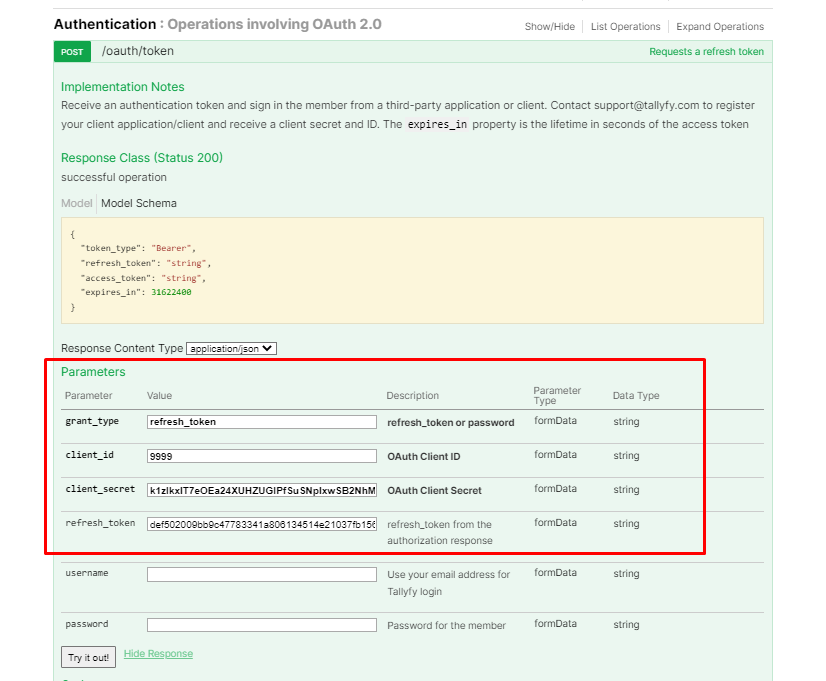
This video demonstrates the token refresh process:
If you encounter authentication problems when using the Tallyfy API, check these common issues:
-
Invalid Token Format: Ensure your Authorization header uses the exact format:
Authorization: Bearer YOUR_ACCESS_TOKENNote: There should be exactly one space between “Bearer” and your token.
-
Token Expiration: Tokens typically expire after 1 hour. Implement token refresh logic or request a new token.
-
Invalid Credentials: Verify your client ID, client secret, username, and password are correct.
-
Missing Required Headers: Ensure all API requests include the
X-Tallyfy-Client: APIClientheader. -
Incorrect Token Request: When requesting a token, verify:
- You’re using the correct endpoint (
https://go.tallyfy.com/api/oauth/token) - The
grant_typeparameter matches your authentication flow - All required parameters for your grant type are included
- You’re using the correct endpoint (
-
Token Invalidated by Logout: Personal access tokens are immediately invalidated when users log out of Tallyfy. This common issue affects automations that rely on user tokens. If your automation suddenly stops working, verify the user hasn’t logged out.
If problems persist, check the response body for specific error messages or contact Tallyfy Support with details about your API implementation and the full error response.
For cross-origin implementation challenges:
- Note any CORS preflight (
OPTIONS) requests - Check response headers for CORS permissions
- Understand allowed origins and methods
When working with dates in the Tallyfy API:
| Direction | Format | Example |
|---|---|---|
| Request (to API) | YYYY-DD-MM HH:MM:SS | YYYY-15-05 14:30:00 |
| Response (from API) | YYYY-MM-DDThh:mm:ss.000Z | YYYY-05-15T14:30:00.000Z |
Ensure your code properly handles these date format conventions to avoid errors.
For event-driven integrations, Tallyfy provides webhook capabilities that don’t require direct API calls:
- Configure webhooks at the process or step level
- Receive real-time notifications when specific events occur
- Process the webhook payload to trigger actions in your systems
For details on webhook configuration, see the webhooks setup guide.
Open Api > OAuth authorization flow for third-party applications
This guide demonstrates implementing OAuth 2.0 authorization flow for third-party applications to authenticate with Tallyfy without exposing user credentials through a secure redirect-based process that returns access tokens for API authentication.
Authentication > Get & use a personal access token
The Tallyfy API uses personal access tokens for authentication which requires including the token in the Authorization header along with Accept and X-Tallyfy-Client headers for all API requests with tokens being invalidated upon logout.
Open Api > API usage as a third-party application instead of a user
Third-party applications can integrate with Tallyfy’s API using the OAuth 2.0 client credentials flow which involves obtaining client credentials from Tallyfy Support then authenticating to get an application-level token that enables programmatic user provisioning and the generation of user-specific tokens for performing API actions on behalf of individual users within the organization.
Was this helpful?
About Tallyfy
- 2025 Tallyfy, Inc.
- Privacy Policy
- Terms of Use
- Report Issue
- Trademarks