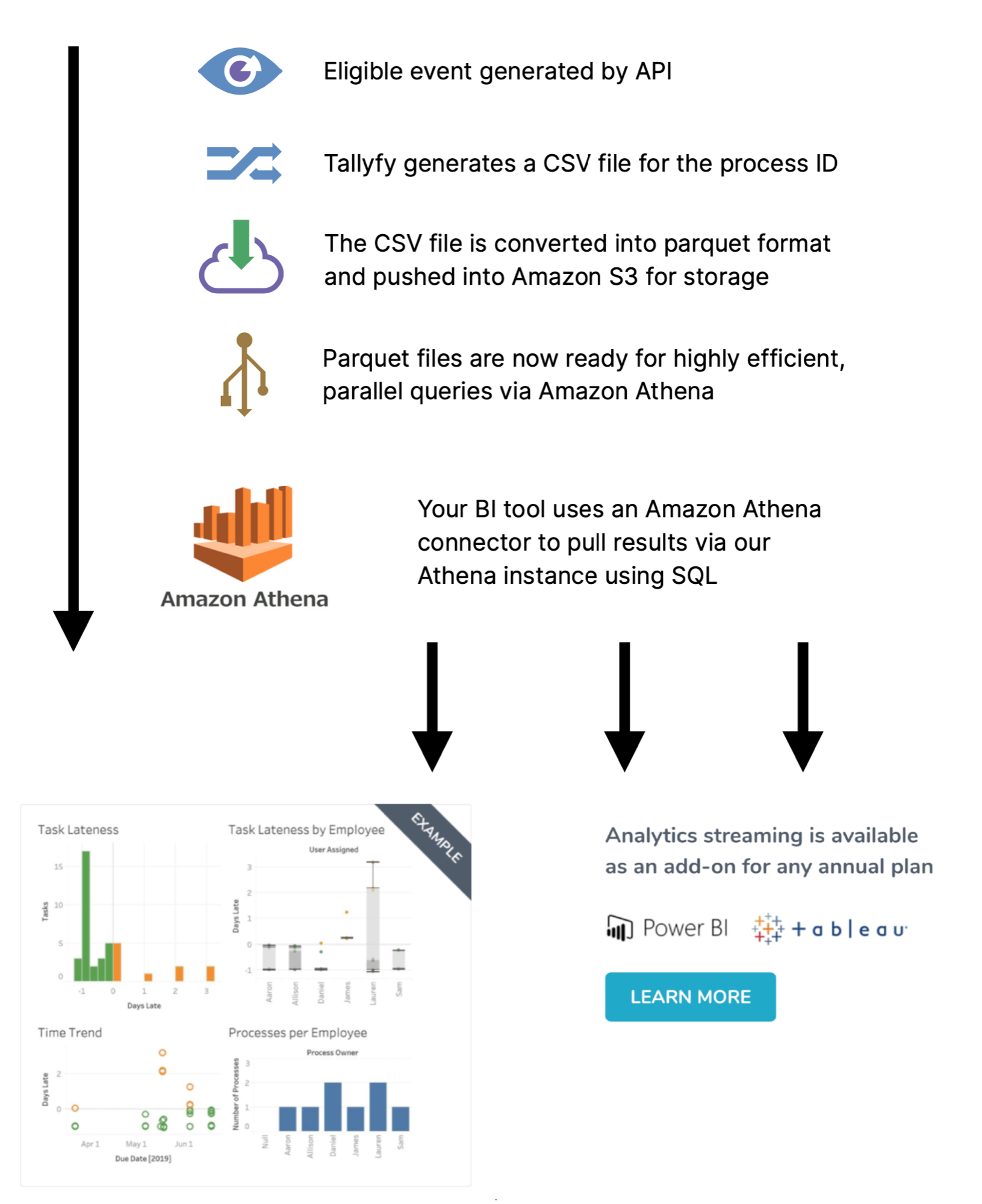
Tallyfy Analytics transforms your workflow data into a format that BI tools like Power BI and Tableau can query directly. Here’s how your data travels from Tallyfy to those tools.
Overview of the data pipeline
Your data goes through five steps to become analytics-ready:
Detecting an event - Tallyfy watches for changes like task completions, process status updates, and user changes.
Extracting the data - A complete snapshot of the process where the event occurred gets captured.
Converting the format - Data is converted to Apache Parquet1 for fast, compressed analysis.
Storing securely - Everything lands in your private Amazon S3 storage bucket.
Providing access - You receive AWS credentials to connect your BI tools.
How the pipeline works in detail
1. Spotting an event
Tasks get completed. Statuses change. Forms get submitted. Processes are created, archived, or restored. When these actions happen in Tallyfy, the system queues them for analytics processing.
2. Getting the data
Each queued event triggers a full process snapshot. The export captures:
Process metadata (owner, status, template name/version, tags, completion timestamps)
Every task’s status, assignees, and due dates
Form field questions and answers
User and guest assignments (including group-based assignments)
Comments and reported issues
This data is initially saved as a CSV file.
3. Changing the format
CSV alone won’t cut it for serious analytics. Tallyfy automatically converts it to Apache Parquet format using snappy compression, which:
Queries much faster than raw CSV files
Takes up significantly less storage space
Works natively with Power BI, Tableau, and other BI tools
4. Storing safely
Your Parquet files land in a dedicated S3 bucket:
Each organization gets a private folder - no other accounts can access it
AWS encryption at rest protects stored data
Both the Parquet files and original CSVs are stored for redundancy
Files stay available throughout your Tallyfy Analytics subscription
5. Allowing access for analysis
Tallyfy provides you with AWS IAM credentials that let your BI tools connect. With these credentials, you can:
Query your data through Amazon Athena2 without managing any database infrastructure
Run SQL queries against your process data
Use standard JDBC/ODBC connections (supported by virtually every BI tool)
Build dashboards and reports on top of the queried data
Technical diagram
This diagram shows the complete data flow:
Activating analytics
A few things to know before you start:
Data processing begins the moment Tallyfy Analytics is activated on your account - not before
You’ll receive your AWS IAM credentials right after activation
Most BI tools can be connected in about 15 minutes using standard JDBC/ODBC drivers
Need data stored in a specific region or format? Contact Tallyfy support first
Tallyfy Analytics is an add-on that replicates your workflow data into a private Amazon Athena environment where you can run SQL queries and connect BI tools like Tableau or Power BI to build custom dashboards and track process trends over time.
Tallyfy’s Power BI integration connects your workflow data through Amazon Athena so you can build interactive dashboards for process optimization, team performance analysis and executive reporting.
Tallyfy Analytics lets you connect Power BI to your workflow data through Amazon Athena using an ODBC driver in about 15 minutes and then build interactive dashboards from per-process Parquet files and member tables while using Access Key authentication (not IAM credentials) pointed at the us-west-2 region.
Tallyfy Analytics connects to Tableau Desktop through Amazon Athena in about 15 minutes by installing a JDBC driver and using Access Key credentials to query workflow data including process durations and task completion rates and form field answers for building visual dashboards.
Footnotes
Columnar storage format optimized for analytics, widely supported by AWS, Azure, and Google Cloud ↩
Serverless SQL query service that analyzes data directly in S3 without loading into a database ↩