Tallyfy connects to thousands of business apps through middleware platforms like Zapier and Make.com using drag-and-drop visual tools that require no coding and let you automatically launch processes from external events and sync data between all your systems in minutes.
Integrations
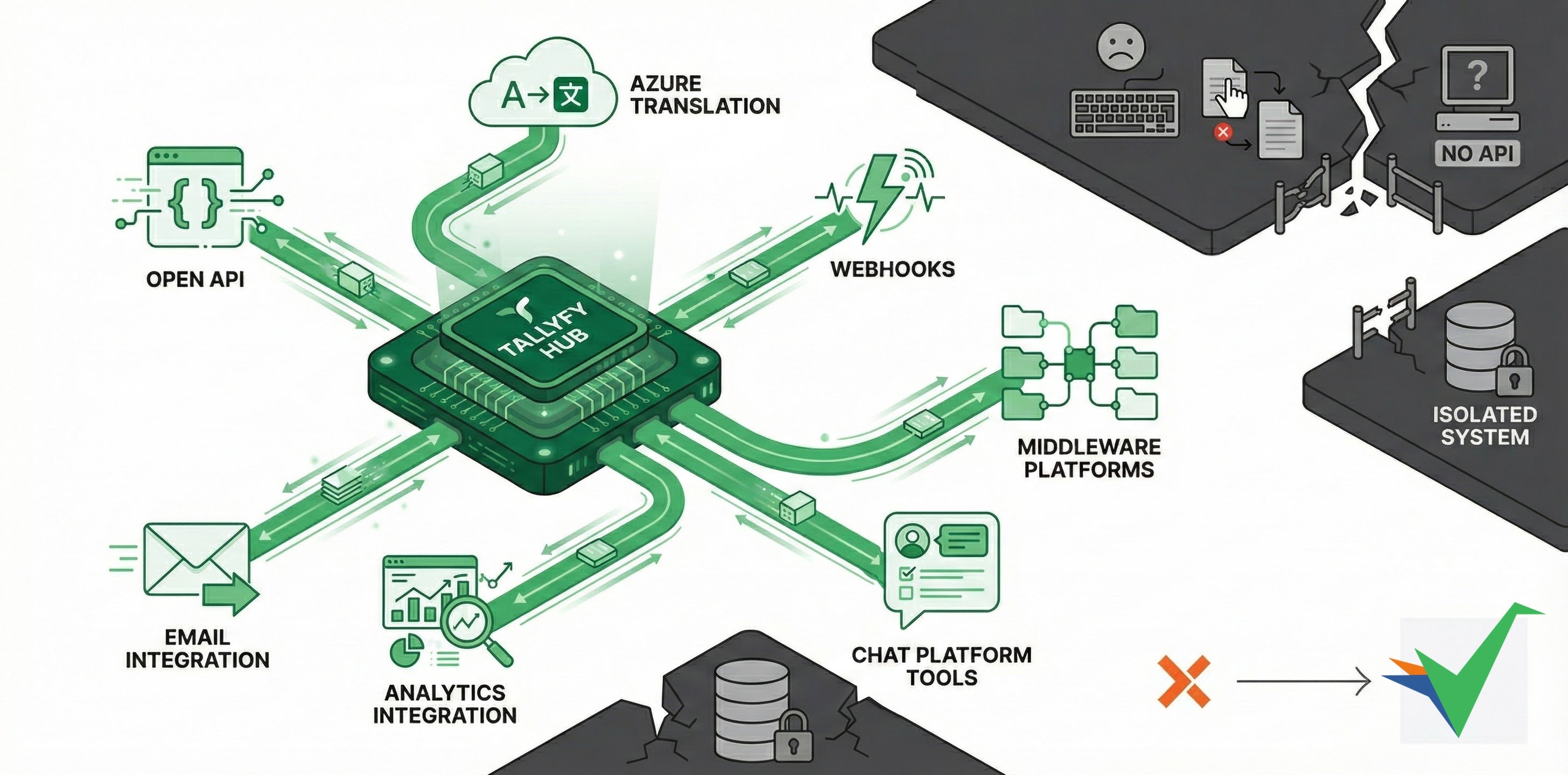
Tallyfy connects with your existing business software through multiple methods - from simple email integrations to full API implementations. Pick what works for your team, whether you’ve got developers or prefer clicking buttons instead of writing code.
Without integrations, you’re stuck copying and pasting data between systems all day. Integrations automatically share data between systems, trigger actions across platforms, and keep everything in sync.
| Integration method | Skill required | Primary benefit | Best for |
|---|---|---|---|
| Open API | High (Development) | Complete control, custom solutions | Custom integrations with full flexibility |
| Webhooks | Medium (Configuration) | Real-time event notifications | Sending Tallyfy events to external systems |
| Middleware Platforms | Low (No-code tools) | Connect multiple apps visually | Cross-app automation without coding |
| BYO AI (Coming Soon) | Low (OAuth setup) | Use your AI subscription in tasks | Automate decisions and content generation |
| Computer AI Agents | Medium (Setup) | Automate UI interactions | Legacy systems without APIs |
| Native Integrations | Low (Configuration) | Plug-and-play connections | Pre-built connections for popular platforms |
| Email Integration | Very Low (Basic setup) | Universal compatibility | Basic connections and process triggering |
| Analytics Integration | Medium (SQL/BI tools) | Workflow data insights | Business intelligence and reporting |
| Chat Platform Tools | Low (App installation) | Task management within chat | Teams using Slack/Teams heavily |
| Azure Translation | Medium (Azure setup) | Real-time content translation | Multilingual and global teams |
| Open Source Resources | Medium-High (Development) | Code examples and community support | Developers seeking implementation guidance |
| Idempotency Handling | Medium-High (Architecture) | Prevent duplicate operations | API and webhook integrations needing reliability |
Tallyfy’s REST API gives developers complete control:
- Build custom apps using Tallyfy workflow data and functionality
- Exchange data bidirectionally between Tallyfy and external systems
- Launch, update, and monitor workflows programmatically
- Manage users, permissions, and org settings through code
Webhooks notify external systems the moment something happens in Tallyfy - a task completes, a process launches or finishes, and more.
- Get instant notifications when tasks complete or processes launch/finish
- Automatically send form data to downstream applications
- Trigger actions in external systems based on Tallyfy events
- Configure webhooks at template and step levels for targeted notifications
Can’t code? No problem. Middleware platforms like Zapier, Make, and Power Automate connect Tallyfy to thousands of apps through visual, drag-and-drop interfaces:
- Use pre-built connections without writing code
- Create integrations using visual workflow builders
- Transform data formats between systems automatically
- Build conditional logic (IF-THEN rules) for smarter workflows
Examples: Zapier, Microsoft Power Automate, Make.com, Workato, Tray.io
BYO AI (Bring Your Own AI) lets you connect your existing ChatGPT, Claude, or Microsoft Copilot subscriptions directly to Tallyfy. Your AI becomes a team member that can:
- Automatically complete tasks based on context and instructions
- Generate content like emails, reports, and summaries
- Make decisions and route workflows intelligently
- Analyze data and provide recommendations
No separate AI costs. No prompt engineering skills needed. Just connect your subscription and let AI handle the repetitive work.
Popular middleware options:
Got ancient software with no API? Computer AI Agents can control it like a human would - interpreting screens, clicking buttons, and filling forms automatically. Good for:
- Legacy systems without APIs
- Dynamic web pages that change frequently
- Multi-step tasks requiring screen context understanding
- Systems where traditional API integration isn’t feasible
Examples: Claude Computer Use, Twin.so, Skyvern, Manus AI
Pre-built connections Tallyfy maintains for specific platforms:
- Official support and testing by Tallyfy
- Simpler setup than custom integrations
- Automatic updates maintained by Tallyfy
- Direct support if issues arise
Everyone has email - that’s why email integration works so well:
- Start processes by sending emails to dedicated Tallyfy addresses
- Configure Tallyfy to send emails from your company’s email server (custom SMTP)
- Use the Tallyfy Gmail add-on to manage tasks from your inbox
- Connect with any standard email system
Featured: Gmail plugin ↗ for managing workflows in Gmail.
Want to know where your processes get stuck? Tallyfy Analytics exports process data for analysis with BI tools:
- Query Tallyfy data using standard SQL (via Amazon Athena)
- Connect reporting tools like Power BI, Tableau, and Looker
- Build custom dashboards and reports
- Identify bottlenecks through performance analysis
Your team lives in Slack? Keep them there:
- Create Tallyfy tasks directly from chat messages
- Launch processes without leaving your chat app
- Receive status updates in relevant channels
- Link conversations to related tasks
Featured: Slack plugin ↗ for managing tasks in Slack.
Got team members in Tokyo, Paris, and Sao Paulo? Azure Translation breaks down language barriers:
- Translate task instructions and comments in real-time
- Let team members work in their preferred language
- Allow each user to set individual language preferences
- Use Microsoft’s AI-powered translation technology
- Meet global workplace language requirements in different countries
Featured: Content translation for text entered by users.
Check out Tallyfy’s GitHub ↗ repository for:
- Sample code for common integration tasks
- Helper scripts and utilities
- Technical implementation guides
- Examples you can adapt for custom solutions
Duplicate events are a real problem. When building integrations with Tallyfy’s API or webhooks, watch out for:
- Webhooks can fire multiple times for the same event (task completed, reopened, then completed again)
- External systems might send duplicate API requests
- Process-level webhooks generate many events that need careful handling
- Without idempotency, you risk duplicate records, incorrect data, or failed operations
Learn how to handle idempotency and build it right the first time.
If your team has developers and clear requirements, AI can draft working integration code fast. Use this when you want custom logic beyond middleware but need speed.
Why use it
- Working integration code in 10-20 minutes
- Clear, maintainable structure with logging and error handling
- Fits your preferred language (e.g. Python or JavaScript)
How it works
- Write a precise spec of the workflow and data mappings
- Use your AI assistant to generate code that calls Tallyfy’s Open API
- Review, test, and deploy
- Iterate as requirements evolve
Example scenario: A logistics team needs shipping workflows that vary by weight, destination, and carrier. A developer describes the rules, generates Python code, and ships the first version the same day.
Ask these four questions:
- Do you have developers? Yes - API or AI. No - Middleware.
- One-time or ongoing? One-time - AI. Ongoing - plan for who maintains it.
- How complex? Simple if-this-then-that - Middleware. Complex - API or AI.
- Timeline? This week - Middleware or AI. Have a month - API for maximum control.
| Factor | Direct API | Middleware | AI Code Generation |
|---|---|---|---|
| Skill required | High (developers) | Low (no-code) | Medium (review code) |
| Setup time | Days to weeks | Hours to days | Hours to days |
| Customization | Unlimited | Limited by platform | High |
| Maintenance | Code updates needed | Platform manages | Code updates needed |
| Cost | Development time | Monthly subscription | AI tool + dev time |
| Best for | Complex, high-volume | Standard workflows | Custom but quick |
Yes. Many teams mix and match:
- Middleware + API: Simple automations in middleware, high-volume or complex work via the API
- AI + Middleware: AI builds lightweight endpoints, middleware wires them up
- Phased approach: Start with middleware for speed, migrate heavy-duty parts to API later
- Actions within emails
- Authentication and SSO
- Azure translation services
- Business systems integrations
- BYO AI (Bring Your Own AI)
- Computer AI agents
- Document management
- Email and SMTP
- Extract tasks from meetings
- Handling idempotency
- MCP server
- Middleware
- Open API
- Robotics
- Tallyfy Analytics
- Vendors
- Webhooks
Pick your path:
- Have developers? Start with the Open API for maximum control.
- Prefer no-code? Explore Middleware platforms to connect Tallyfy without writing code.
- Need insights? Set up Analytics connections for custom reporting.
- Move fast? Use AI-powered code generation to scaffold an API integration and iterate.
n8n is a developer-friendly automation platform with a dedicated Tallyfy connector offering 55 operations across 10 resources that lets you visually build workflows connecting Tallyfy to hundreds of business apps while supporting self-hosting and AI-powered automation patterns like intelligent process launching and cross-system orchestration.
Tallyfy’s Zapier integration lets you automatically launch processes and complete tasks and sync form data across thousands of business apps without coding by creating trigger-action workflows called Zaps that connect Tallyfy to tools like CRMs and HR systems and helpdesks.
Microsoft Power Automate serves as a no-code bridge between Tallyfy and your other business systems—including Office 365 and SharePoint and Dynamics—using a Premium-tier OAuth 2.0 connector with 13 actions to sync data and automatically launch processes or complete tasks based on events happening across your entire software stack.
Was this helpful?
About Tallyfy
- 2025 Tallyfy, Inc.
- Privacy Policy
- Terms of Use
- Report Issue
- Trademarks