Tallyfy templates are reusable process blueprints that you create once and launch repeatedly to assign tasks and track progress automatically while solving problems like inconsistent quality and lost knowledge through three types: procedure templates for multi-step workflows with conditional logic and document templates for reference materials and form templates for standalone data collection.
Templates vs. processes
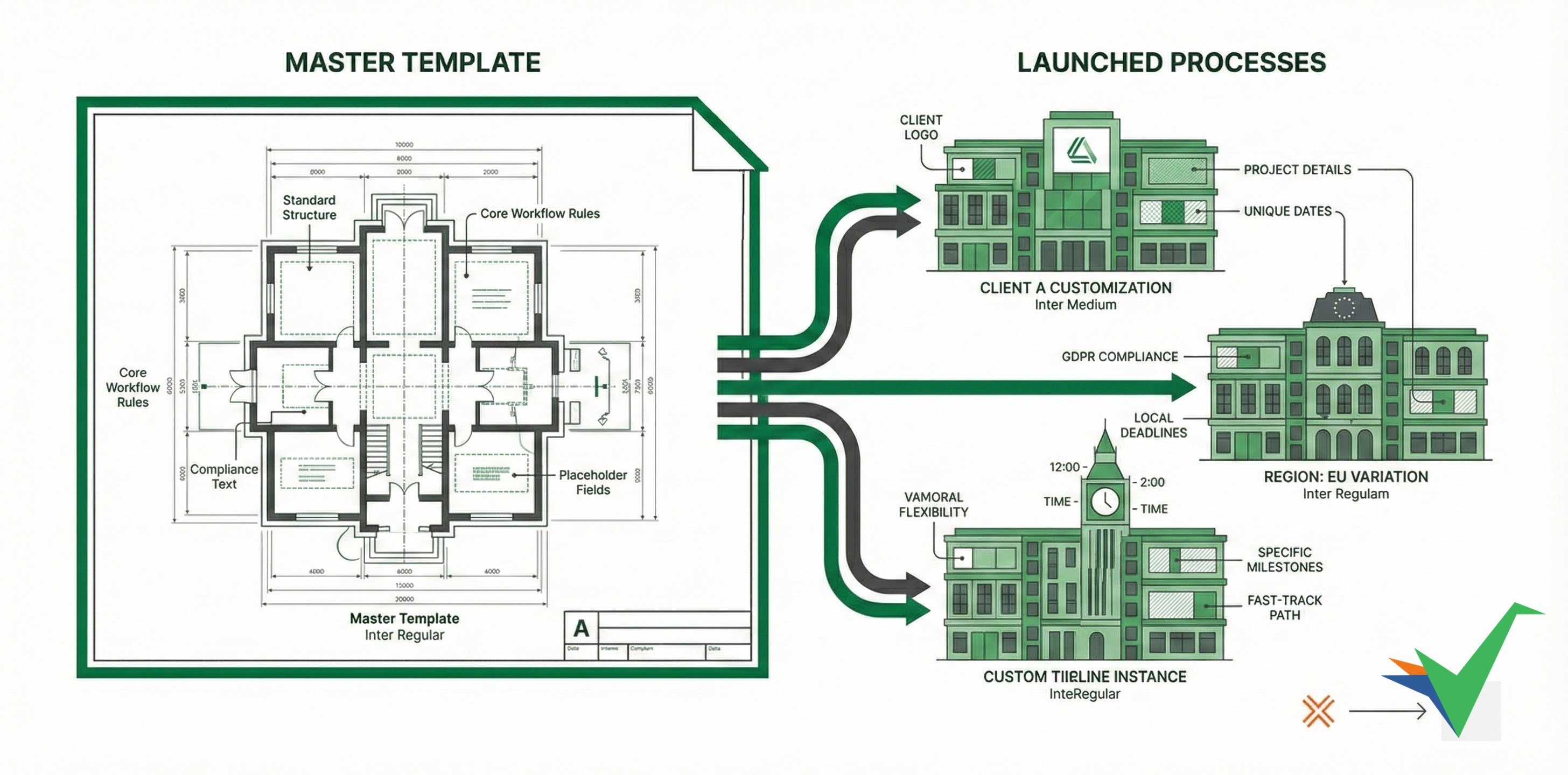
Templates in Tallyfy are your single source of truth - one authoritative version that generates customized processes. Update the template once, and future launches stay consistent. Running processes aren’t affected.
Think of it like a cookie cutter (template) and cookies (launched processes). Same shape - but each cookie gets different icing, sprinkles, or decorations.
One master template spawns multiple customized processes while each stays version-independent.
Diagram description: A single master template generates multiple customized process instances with a continuous improvement loop. Each process has unique customizations (Client A data, Client B timeline, Client C regional rules). Feedback from running processes flows back to improve the template for future launches.
What to notice:
- One-to-many relationship - A single template creates unlimited process instances, each customized for different clients or regions
- Version independence - Processes launched from v1 continue unchanged even after the template updates to v21 - in-flight work stays consistent
- Continuous improvement - Feedback from running processes improves future template versions without disrupting current ones
Templates (blueprints)2
- Purpose: Define standard process structure and rules
- Editing: Only users with
checklist_editpermission can modify - Content: Placeholders, automation rules, and standard text
- Versions: Revision history for compliance
- Location: Templates section in Tallyfy
- Purpose: Execute actual work with real data
- Editing: Users fill in fields and complete tasks
- Content: Actual client names, dates, and specific information
- Status: Tracks progress through active workflow
- Location: Tracker section in Tallyfy
You control what users can and can’t change when they launch a process:
- Set field permissions - mark fields as editable or read-only
- Define conditional paths - create IF-THEN rules for dynamic workflows
- Set up automation - configure rules for assignments and deadlines
- Lock standard content - protect compliance text and procedures
When someone launches a process from your template:
- Fill in specific data - client names, project details, dates
- Activate conditional paths - selections determine which tasks appear
- Edit allowed sections - change fields marked as editable
- Own timeline - each process tracks its own deadlines
Challenge: CBRE manages hundreds of playbooks with multiple variations - agency vs. principal delivery models, different service types, and regional requirements across North America, Europe, and Asia.
Without Tallyfy: 100+ PowerPoint files with slight variations, manual updates when standards change, version control chaos with local copies, and no way to filter content dynamically.
With Tallyfy: One template with all variations, dynamic filtering based on user selections, instant updates when standards change, and each launched process shows only relevant content.
| Traditional documents | Tallyfy templates |
|---|---|
| 100 copies of same SOP | 1 master template |
| Manual version tracking | Automatic versioning |
| Update each copy separately | Update template once |
| Static content for all | Dynamic, filtered content |
| Lost customizations in updates | Preserved instance data |
| Email chains for status | Real-time progress tracking |
| Scattered feedback | Centralized comments |
Yes. Changes only affect future launches. Running processes continue with the version they started with.
No. Running processes keep their original structure. In-flight work stays safe.
Template changes don’t affect running processes
Processes are snapshots taken at launch time. Tallyfy creates an independent copy with the template’s structure at that moment. Adding tasks, changing steps, or modifying the template afterward won’t change already-running processes. To apply template updates, launch a new process.
Use conditional logic instead of separate versions. One template shows different content based on team, region, or other criteria.
Don’t create 12 separate templates. Use conditional visibility and dynamic fields. One smart template replaces dozens of static documents.
- Identify common elements across all variations
- Use snippets for repeated content
- Build in flexibility with variables
- Decide what users can change vs. what stays locked
- Use form fields to capture variation needs
- Set up automation rules for different paths
- Launch test processes for each major variation
- Verify conditional logic works correctly
- Gather feedback from pilot users
- Review the template regularly
- Update based on process feedback
- Document major version changes
- Identify commonalities - find shared content across all versions
- Map variations - document what makes each version different
- Build smart - create one template with conditional logic
- Import content - use AI import to convert your best version
- Add automation - layer in rules and conditions
- Test thoroughly - verify all paths work correctly
- Train teams - focus on the “why” of single-source benefits
Tracking And Tasks > An overview of processes
In Tallyfy a process is a live running instance of a template that you launch and track daily where each process captures a snapshot of its template at launch time and can be uniquely named or auto-named while allowing extra tasks to be added on the fly and then archived or restored after completion.
Tallyfy lets you launch reusable templates into independent trackable processes — each with its own name and deadlines and assignments — through six different methods including manual clicks and API calls and email triggers and magic links while template edits only affect future launches and never alter already-running work.
Tallyfy transforms static documents into three types of living templates—Procedure Templates for tracked multi-step workflows with automation rules and task assignments; Document Templates for consistent policies and reference materials with locked sections and fillable fields; and Form Templates for structured one-shot data collection—so teams can pick the right format based on whether they need sequential task tracking or reusable document structures or simple data gathering.
Was this helpful?
About Tallyfy
- 2025 Tallyfy, Inc.
- Privacy Policy
- Terms of Use
- Report Issue
- Trademarks