Tallyfy lets you generate a read-only public link for any running process so outsiders can view real-time progress without an account and you can control whether comments form fields and assignees are visible while being aware that making a process public also expands what guest users can see across all tasks.
Publish a template
To make a template public in Tallyfy, click Edit on your template, go to Settings, find Public to the world, and switch it to yes. Anyone can then view your template structure1 without logging in. You’ll get a shareable link to send to clients, partners, or vendors.
- Administrator or Standard member permissions (Light members can’t edit templates)
- A template ready for public sharing
- Share with anyone - give a direct link to view your process. No login or Tallyfy account needed
- Show examples - display your workflows to potential customers as proof of how you work
- Provide documentation - external teams can access process info instantly
- Help others learn - let people see how you’ve structured your processes
- Go to the Library view where your templates are listed
- Find the template you want to publish
- Click Edit to open the template editor
- Click Settings (or Config) in the editor toolbar
- Go to the Permissions tab
- Find Public to the world and switch it to yes
- Click Save
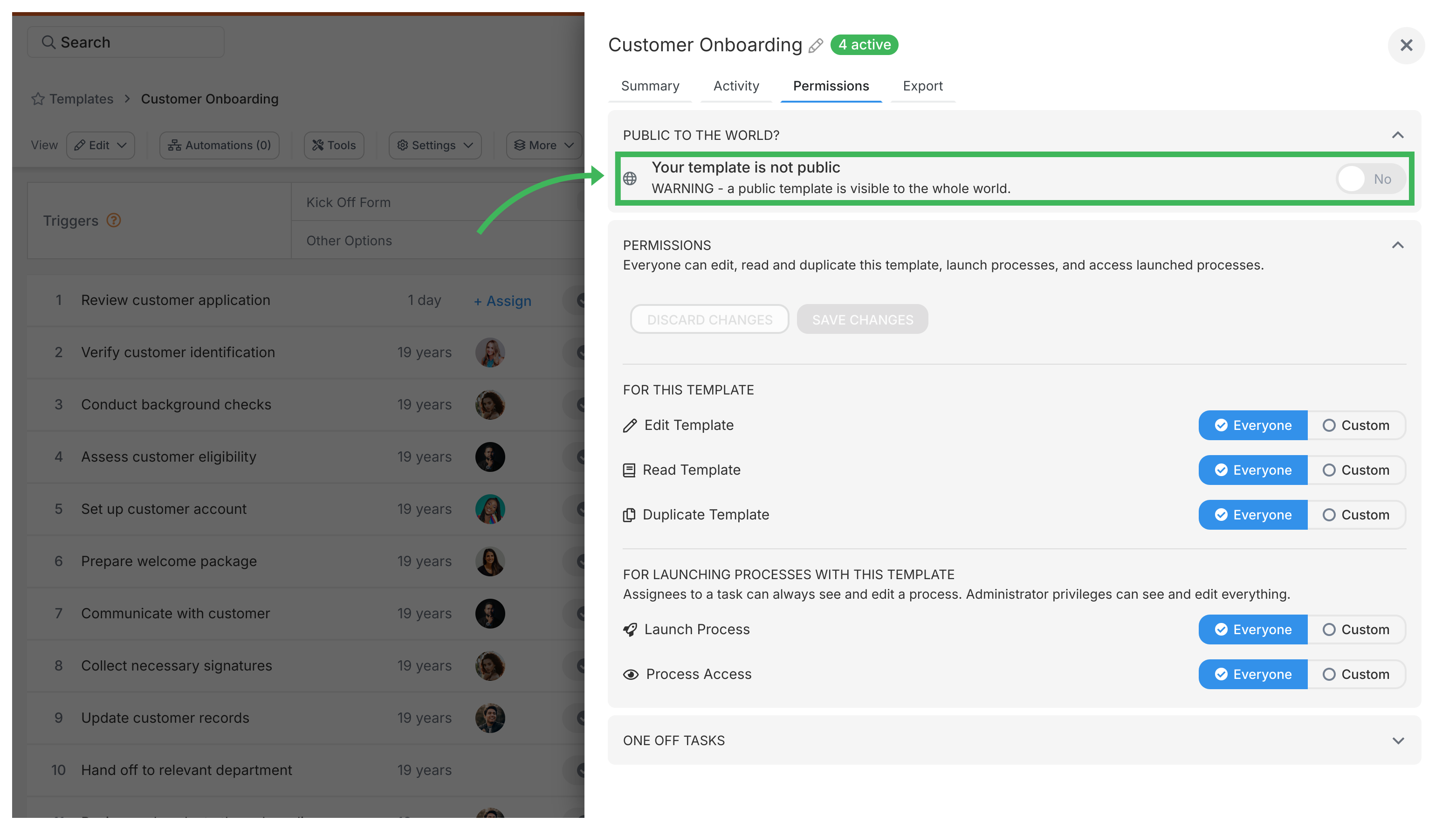
You’ll get a shareable URL in the template settings. You can:
- Share this link anywhere - email, chat, website, social media
- Let people view the template structure without logging in
- What’s public? Only the template structure - steps, descriptions, summary, guidance, and kickoff fields. Think of it like sharing a recipe without showing what you cooked last Tuesday
- What’s private? Form field responses, task completions, internal comments, and assignment data don’t show up publicly
- How to unpublish? Go back to settings, switch Public to the world to no, and it’s instantly private again
Templates > Configure your template
Tallyfy’s template settings let you control general options like duplicating and archiving along with summary details and permissions and export IDs so you can organize and restrict who can view or launch processes from any template.
Tallyfy templates are reusable process blueprints that you create once and launch repeatedly to assign tasks and track progress automatically while solving problems like inconsistent quality and lost knowledge through three types: procedure templates for multi-step workflows with conditional logic and document templates for reference materials and form templates for standalone data collection.
Click the Edit icon on any template card in Tallyfy to modify steps, descriptions, settings, and permissions in the Edit view.
-
In Tallyfy’s API, templates are called ‘blueprints’ and include steps, fields, and routing logic ↩
Was this helpful?
About Tallyfy
- 2025 Tallyfy, Inc.
- Privacy Policy
- Terms of Use
- Report Issue
- Trademarks