
Process managers vs step owners - the assignment problem nobody talks about
When building workflow software, the distinction between process-level managers and step-level owners creates fundamental design tensions that shape how work actually gets done.
Process management roles determine how work gets assigned and tracked. Here is how we approach workflow management.
Workflow Made Easy
Summary
- Process manager vs owner roles - this is our personal, candid experience designing them at Tallyfy. Not theory. The debates about bulk-assignment vs individual ownership, and why pride and guilt matter in role design.
- The Assign tab was our biggest flaw - as I wrote in September 2017: “At present, we have the Assign tab - where a lone user assigns someone to do something. This is the biggest flaw and inversely - our greatest opportunity.”
- Consensus over steps drives adoption - if employee onboarding touches 8 people, how do you get others to confirm or update the step you said they do? That question drove everything.
- Pride and guilt beat permissions - instead of “assign” owner, we explored “I know who does this”. The act of confirming a step becomes a matter of pride.
This reflects our experience at a specific point in time. Some details may have evolved since, and we have omitted certain private aspects that made the story equally interesting.
Back in September 2017, I wrote what would become one of the most consequential design posts in Tallyfy’s history. The title was blunt: “Our most important problem + opportunity - consensus over a step and collaborative creation.”
The question that started it all:
“If employee onboarding touches 8 people, how do I get others to confirm or update the step I said they do? How do you make my job of getting everyone using Tallyfy easier by making each of the 8 people feel a sense of ownership over their piece of the process?”
This was not an abstract product question. This was the core obstacle to adoption we saw in every demo, every trial, every churned account.
The lone user problem
Here is what I wrote in that September 2017 thread:
“At present, we have the Assign tab - where a lone user assigns someone to do something. IMO - this is the biggest flaw and inversely - our greatest opportunity to get process consensus and grow Tallyfy within a company far more quickly through buy-in, solving both the adoption and invitation problem.”
The traditional workflow software model assumes one person knows everything about a process. They build it. They assign steps. They launch it. Everyone else just follows instructions.
That model breaks immediately in reality. No single person knows how every step in a cross-functional process actually works. The person building the employee onboarding template is not the same person who does the IT setup, the payroll configuration, the badge provisioning, or the benefits enrollment.
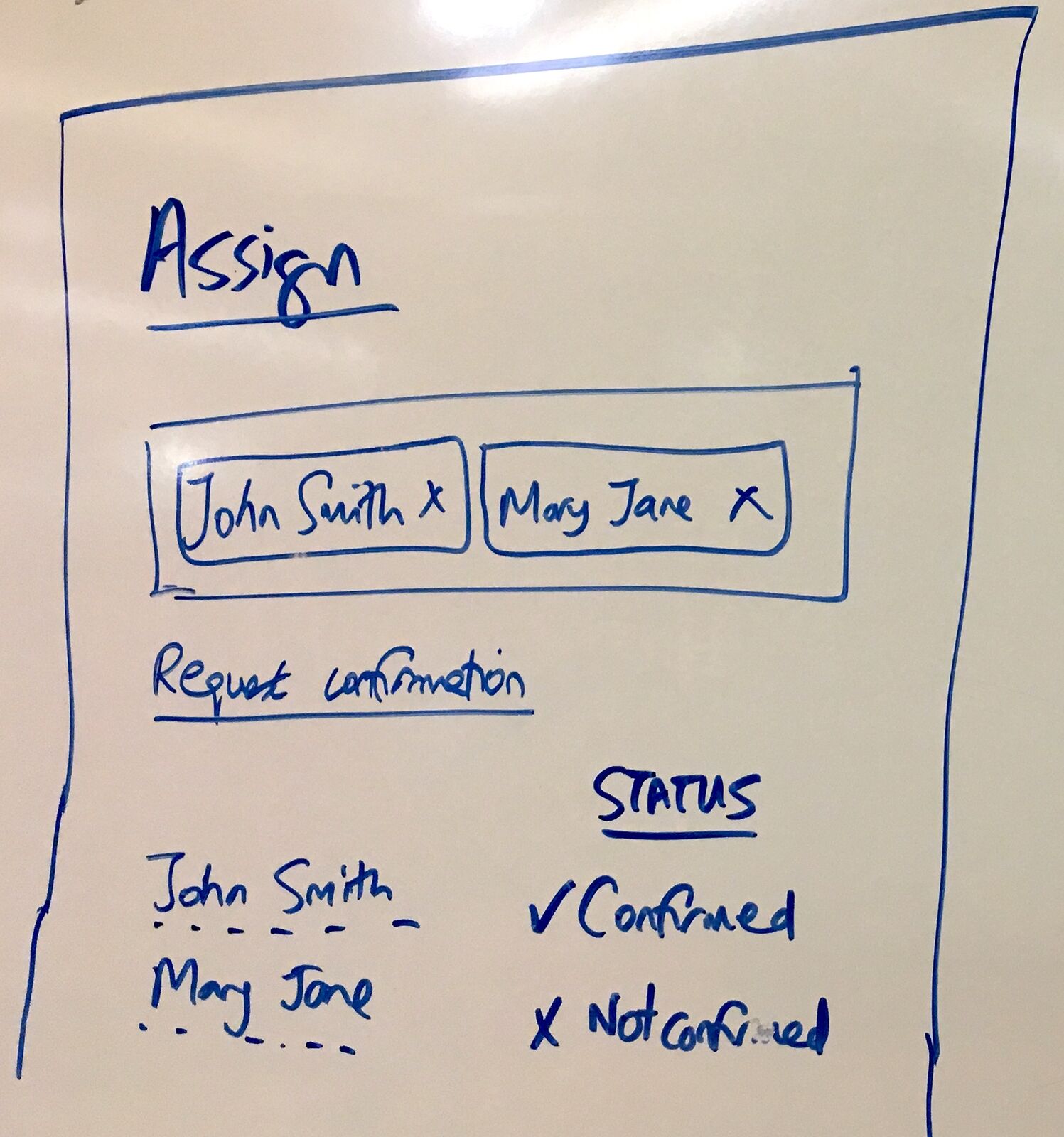
This whiteboard sketch from August 2017 shows what we were wrestling with - how do you visualize whether each owner has actually confirmed their role in the process?
Process managers - the bulk assignment insight
Three months later, in December 2017, I was studying how MetaTask approached this problem. Here is what I wrote:
“The concept of a process manager is interesting - instead of specifically assigning one user at a time for each step, I believe it is a bulk-assignment of people that enables those people to have all permissions over any step in that process.”
This was the insight that changed everything. Traditional workflow tools force you to assign owners step by step. But what happens when you need someone to oversee the entire process? What about the person responsible for making sure the whole thing gets done, regardless of who owns each individual piece?
In discussions we have had about enterprise-scale deployments, this pain point surfaces repeatedly. One FMCG company running category planning processes across 50+ retail partners found that their operations director was bottlenecked on every process modification. She needed to delegate day-to-day management to regional team leaders without granting them access to billing, integrations, or org-wide settings.
The solution was to separate two fundamentally different responsibilities:
Process Managers: People who have permissions over the entire workflow - they can reassign any step, skip steps if needed, add ad-hoc tasks, or close the whole process.
Step Owners: People responsible for completing one specific task - they can complete their step, add comments, and request reassignment.
Pre-defined groups solve the cold-start problem
One of the debates we had internally was how to handle group assignment from the beginning. Here is what emerged from studying other systems:
“On assigning an owner to a step, some pre-set groups already exist e.g. HR, Sales, etc. and it turns out that all users belong to all groups (until you remove them). This helps make the concept of how assignment should work clear from the outset - you should use groups, not individuals. You can also select an entire group as assignee.”
This was counterintuitive at first. Why would you default everyone to every group? But it solved a real problem - when a new organization starts using workflow software, they do not have their groups set up yet. By defaulting everyone to pre-set groups, assignment rules make sense immediately. You can always refine later.
The principle is simple: groups over individuals, always. This is now documented in our member management guide.
This employee onboarding template demonstrates exactly what we were trying to solve - a process that touches HR, IT, Office Manager, and direct managers. Each step has a clear owner, but someone needs to oversee the whole thing:
Pride and guilt in copy text
This is where the design conversation got interesting. From my September 2017 post:
“Instead of ‘assign’ owner - we might use for example ‘I know who does this’ or something like that. The act of the other side confirming their step is then a matter of pride, and should be celebrated and seen as such.”
And then this:
“We need to design the notion of a step being incomplete. I suggest we do it via progress bars for every step in the builder. This would encourage people to fill it out. I would go so far as to say that a process is not publishable unless we believe it is complete in terms of each step having a title and an owner as a minimum.”
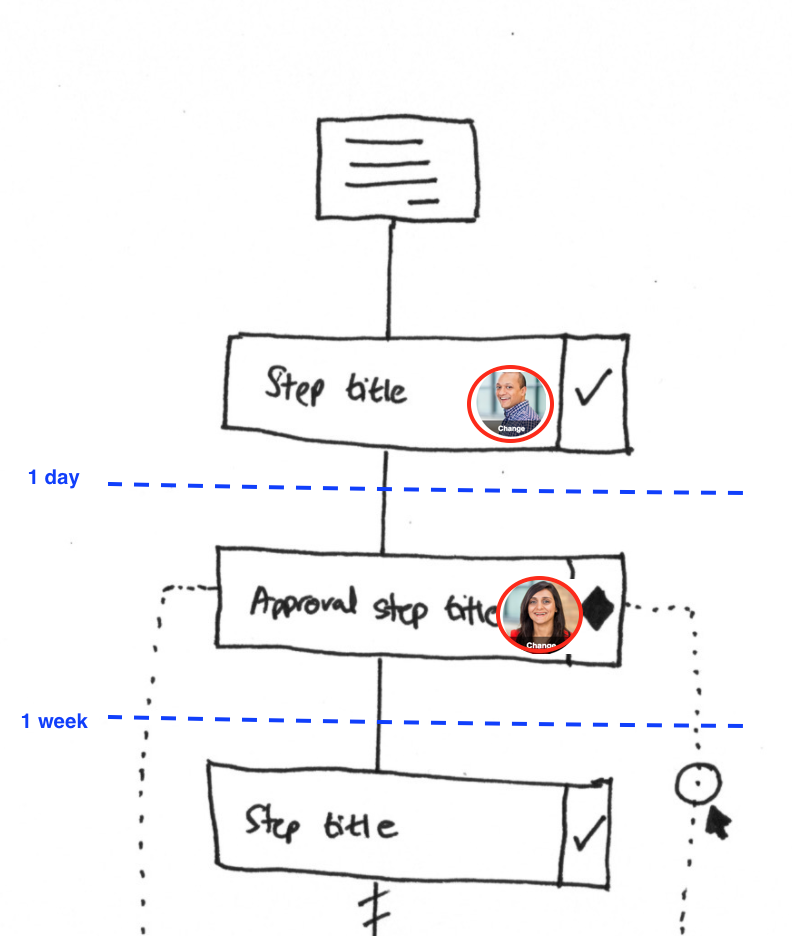
This sketch shows the view we were designing - a simple list where you can see who owns each step and when it is due. The visual clarity was meant to create social accountability.
The psychology here matters. At Tallyfy, we have seen that assignment is not just about permissions - it is about identity. When someone confirms they own a step, they are making a public commitment. That creates healthy pressure to follow through.
The purposeful first-time experience
We spent significant time thinking about what happens when someone gets invited to confirm a step. From the original thread:
“If someone has never seen or heard of Tallyfy before, and gets an email like this - it makes the perfect contextual introduction into the app. Janet has asked you to confirm that you do this step within PROCESS NAME. Button - Yes, I do this! Button - Suggest changes.”
The comparison I made was to Facebook’s friend request: “Are you my friend?” Simple, clear, one decision.
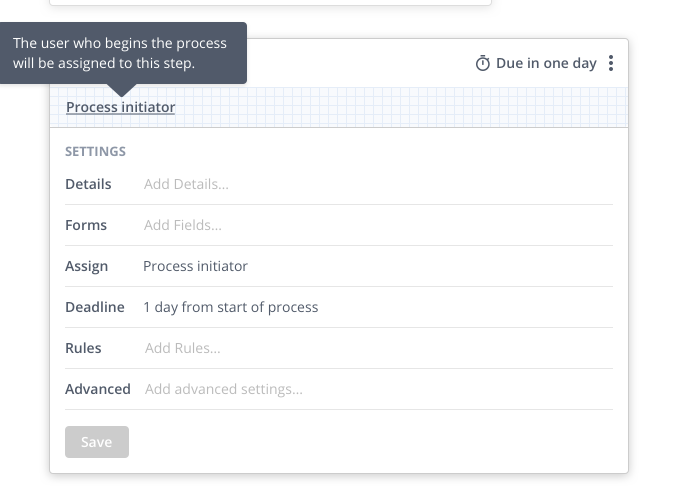
This screenshot shows the UI we were evolving toward - a clear area for “Clarification” where owners could confirm or update step details.
Every invitation into Tallyfy needed to be purposeful. Not “you have been invited to yet another app” but “your colleague needs you to confirm that you handle this specific step in this specific process.”
The what, who, when framework
As we designed the template editor, we kept coming back to three fundamental questions for every step:
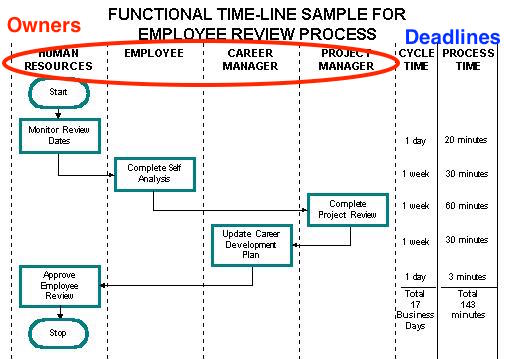
This traditional swimlane diagram shows the problem. A process involves multiple functional areas - each swimlane represents a different “owner” but someone needs to own the overall process.
Every step needs:
- What: The task title and description
- Who: The owner or group responsible
- When: The deadline relative to other steps
The “Who” column became the most complex because it needed to handle individuals, groups, and dynamic assignment like “Process starter” all in one interface.
The run starter pattern
One pattern that emerged repeatedly in production was the need to assign steps to “whoever started this process.” Here is how it shows up in the API:
{
  "metadata": {
    "owner": "run_starter",
    "do_in_order": "no",
    "allow_not_done": "yes",
    "is_reassignable": "0",
    "allow_guest_owners": "1"
  }
}
The "owner": "run_starter" pattern solves a common problem: self-service workflows where the person requesting something should also complete certain steps. Support requests, for example - the requester often needs to provide additional information as the process progresses.
This is now a core pattern in process tracking.
The permission hierarchy that actually works
After years of iteration, here is what emerged as the working model:
Organization Admin > Process Manager > Step Owner > Viewer
Process managers can:
- Reassign any step to anyone
- Skip steps if needed
- Add ad-hoc tasks mid-process
- Close or cancel the entire process
Step owners can only:
- Complete their assigned step
- Add comments
- Request reassignment (but not execute it directly)
This hierarchy came from watching real organizations use the software. The debates were fierce - should step owners be able to reassign? The answer is no, because that breaks accountability. If you want to pass work to someone else, you need a manager to approve it.
Handling deactivated users
One edge case we had to handle carefully: what happens when a user is disabled but has tasks assigned to them?
From our December 2017 design discussions:
“If user B was the creator or made the owner of any template or had 1 or more tasks assigned to them, including one-off tasks assigned by others and themselves, user A sees a new screen and sees all templates and tasks listed under their process names.”
The solution was to provide two options when disabling a user:
- Just remove them (if they have no active assignments)
- Re-assign all their work to another active member
This prevents orphaned tasks and ensures continuity of accountability.
What we left out
There were several ideas we considered but ultimately did not implement:
Automatic process manager detection: The idea of inferring who should manage a process based on who launches it or who owns the most steps. We decided explicit assignment was clearer.
Manager hierarchy inheritance: Automatically granting process manager rights to the direct manager of step owners. This created too many edge cases with matrix organizations.
Multiple process owners with voting: The idea that multiple people could share process ownership with some kind of consensus mechanism for decisions. Too complex for the core use case.
Automatic load balancing: Assigning to whichever group member has the fewest active tasks. We left this out because it assumes all tasks are equal weight, which they never are. Feedback we have received from pharmaceutical companies running vendor onboarding processes reinforces this. A cybersecurity review might take 8 hours while a document upload takes 5 minutes. Balancing by count rather than effort creates the illusion of fairness while hiding real workload imbalances.
Deadline inheritance from owners: The idea that a step deadline should adjust based on the assigned owner’s calendar. Too complex, too many edge cases with timezone handling.
Manager escalation chains: Automatically escalating to the manager’s manager after N hours. Organizations kept wanting this until they realized it created notification fatigue.
Role-based assignment without groups: Assign to “anyone with the Sales role” without creating a Sales group. This seemed redundant - if you have roles, make groups from them.
The principle became: explicit assignment beats implicit assignment, every time. If someone is responsible, their name should appear somewhere.
Why this still matters
This design work happened in 2017-2018, but the underlying tensions have not changed. Every workflow tool eventually faces the same questions:
- Who oversees the whole process vs who does individual tasks?
- How do you assign work to teams without creating bottlenecks?
- What permissions should each level have?
- How do you handle dynamic assignment based on runtime data?
The answers we arrived at - process managers with bulk permissions, groups over individuals, run starter for dynamic assignment - came from watching real organizations struggle with real workflows.
The engineering challenge is not building the features. It is understanding that assignment is fundamentally about organizational power structures, and your software will either reinforce good patterns or create chaos.
The question I asked in September 2017 still guides every assignment feature we build: how do you make each person feel a sense of ownership over their piece of the process?
About the Author
Amit is the CEO of Tallyfy. He is a workflow expert and specializes in process automation and the next generation of business process management in the post-flowchart age. He has decades of consulting experience in task and workflow automation, continuous improvement (all the flavors) and AI-driven workflows for small and large companies. Amit did a Computer Science degree at the University of Bath and moved from the UK to St. Louis, MO in 2014. He loves watching American robins and their nesting behaviors!
Follow Amit on his website, LinkedIn, Facebook, Reddit, X (Twitter) or YouTube.

Automate your workflows with Tallyfy
Stop chasing status updates. Track and automate your processes in one place.